
SaaS and Technology Landing Page Case Study
How Strategic SaaS Landing Page Copy Turned Operational Chaos into Measurable Conversions
Scope:
Conversion-Focused SaaS Landing Page Copywriting for B2B Product-Led Growth Brand
Industry:
B2B SaaS / Productivity Tools / Remote Work / Project Management
What Was Delivered:
High-Converting SaaS Landing Page Copy (Direct Response | Trial-Focused Conversion Page)
Strategic Overview
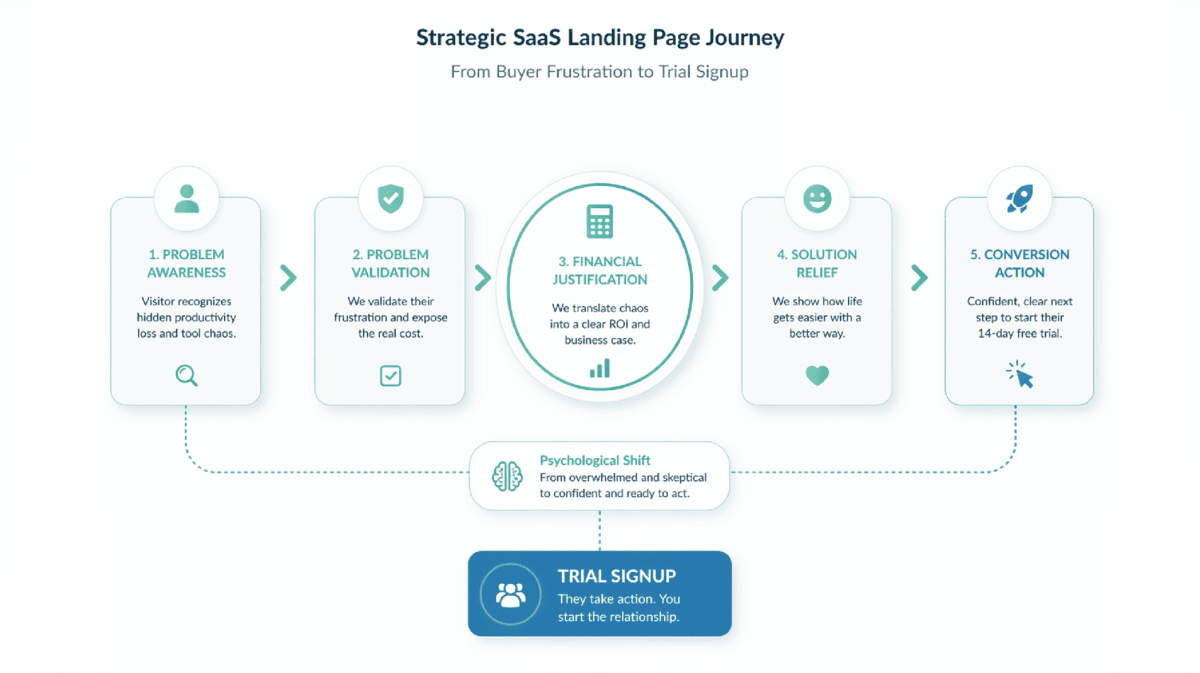
A direct-response landing page written for FlowSync — converting remote team leads suffering from disconnected tool stacks into trial users, by naming and quantifying the hidden cost they’re already paying.
The strategic frame: The Toggle Tax — 23 minutes of lost refocus time per tool switch, scaled across a 20-person team to $478,750 in annual productivity waste. Understanding how content influences buying decisions for B2B buyers reveals the core challenge: decision-makers need financial justification, not feature lists. This page builds that case.
The visitor arrives feeling overwhelmed. They leave having named the problem — and holding a number their CFO can’t ignore.
The Problem: Why Most SaaS Landing Pages Fail to Convert Hesitant Buyers
Remote team leads in the 5–50 person range are the most skeptical SaaS buyers in the market. They have three specific objections that generic landing pages never resolve:
- “We already have too many tools.” The last thing they want is another platform to manage. A standard feature-led landing page triggers this objection immediately.
- “Our team won’t adopt it.” They’ve bought software that died in onboarding. Tool sprawl didn’t happen because they chose badly — it happened because each tool promised to be the last one they’d need.
- “I can’t justify the budget.” Without a concrete ROI number tied to their team size, the purchase stays theoretical and the trial never starts.
The deeper problem: the visitor is experiencing daily friction — context-switching, status meetings, version confusion — but attributing it to team discipline rather than systemic tool design. Until that misattribution is corrected, no amount of feature copy will convert them.
The Strategy:
Four Pillars Behind the Page
The most effective SaaS landing page for a hesitant buyer doesn’t sell the software — it sells the financial cost of not switching.
The Toggle Tax Hook
The page reframes productivity loss as a measurable financial cost. By combining a neuroscience-backed 23-minute refocus delay with daily tool switching, it translates inefficiency into a $478,750 annual loss.
This turns vague “productivity loss” into a P&L line item—shifting the decision from “do we need this?” to “can we afford not to address it?”
Frankenstein Stack Validation
Instead of blaming the user, the page validates their tool chaos as an industry-wide design flaw. By reframing the problem as systemic, it removes buyer defensiveness and builds trust.
It redirects frustration toward systemic causes, creating the psychological safety needed for the consolidation argument to land.
ROI Math as Budget Ammunition
A transparent, step-by-step cost breakdown is presented as a standalone section. With clear team-size scenarios, the page equips buyers with a concrete financial argument they can take to leadership, turning interest into justification.
This gives buyers something they can take to their CFO—turning the decision from personal preference into a business case.
Mirror Moment Benefits
Features are translated into real-life outcomes the buyer already desires—less stress, faster onboarding, and clearer visibility. These “mirror moments” connect logic with emotion, making the solution feel both practical and personally relieving.
Rational buyers need ROI. Exhausted humans need relief. Mirror moments serve both simultaneously.
The Execution: Full Landing Page
Stop Paying the Toggle Tax.
Your team isn’t slow. Your tools are.
Four tabs open. Three Slack notifications pinging. Two versions of “Final_v2” floating somewhere between Drive and email. One missed deadline.
This is the Toggle Tax. And it’s costing you six figures annually.
Every time your team switches between tools — Slack to Trello to Drive to Email — their brain needs 23 minutes to refocus. Do that five times a day across a 20-person team, and you’ve burned 100 hours per week on digital whiplash alone.
That’s $120,000 per year in lost productivity. Gone. Not because your team lacks discipline. Because your tools create friction.
FlowSync eliminates the Toggle Tax. One system for tasks, files, updates, and decisions. No more app juggling. No more “Where did we put that?”
[Start Your 14-Day Efficiency Audit →]
No credit card required • Set up in 10 minutes
Meet Your Frankenstein Stack
Let’s name what you’re already living with.
Chat for quick questions. Tasks in Trello. Files in Drive. Client requests in email. Time tracking somewhere else. Roadmap in yet another tool.
Each one solves a piece. Together, they create chaos.
Updates live in chat.
Deadlines live in tasks.
Decisions live in meetings.
Accountability lives nowhere.
You didn’t choose this mess. The industry gave you fragments and called it flexibility.
This isn’t collaboration. It’s friction disguised as choice.
The result? Your team spends more time managing tools than doing actual work. Status updates require meetings because no single system shows the truth. Files get lost. Context gets repeated. Momentum dies in the handoffs.
You’re not disorganized. You’re over-equipped.
One System. One Timeline. One Truth.
FlowSync collapses the chaos into a single source of operational truth.
Reclaimed Hours
Fewer handoffs. Fewer check-ins. Less re-explaining.
Teams get back 5–10 hours per person per week. That’s 200–400 hours per month for a 20-person team. Hours currently spent searching, repeating, and coordinating work that should be automated.
Mirror moment: You close your laptop Friday at 5 PM knowing exactly what shipped, what’s blocked, and what’s next — without a single status meeting.
Centralised Truth
Every task, decision, file, and dependency lives in one place.
No more “Which tool has the latest version?” No more hunting through Slack threads from two weeks ago. No more version confusion that spawns 30-minute meetings.
Mirror moment: A new hire asks where to find something. You send them one link. They find it in 10 seconds. Onboarding that used to take two weeks now takes two days.
Operational Calm
Work flows forward without constant chasing.
Tasks move through stages automatically. Handoffs trigger notifications. Blockers surface before they become crises. Your role shifts from firefighting to planning.
Mirror moment: Sunday night without dread. You know what your team is working on. You know what’s at risk. You’re prepared for Monday without working the weekend.
Built-In Accountability
Progress is visible without micromanagement.
Every task shows who owns it, when it’s due, what’s blocking it. Transparency without surveillance. Trust without blind faith.
Mirror moment: The board meeting you’re actually relaxed for — because the data is already there, accurate, and current.
What the Toggle Tax Is Really Costing You
Let’s do the math leadership is ignoring.
The Toggle Tax calculation:
Every context switch costs 23 minutes of refocus time (research-backed).
Your team switches tools 5 times per day (conservative estimate).
That’s 115 minutes lost per person daily just recovering from interruptions.
Scale it:
- 20-person team
- 115 minutes per person per day = 2,300 minutes daily
- 2,300 minutes = 38.3 hours per day
- 38.3 hours × 5 work days = 191.5 hours per week
- 191.5 hours × 50 weeks = 9,575 hours annually
Convert to dollars:
At an average rate of $50/hour (conservative for knowledge workers):
9,575 hours × $50 = $478,750 per year
You’re already paying this cost. FlowSync just helps you stop.
For a 5-person team: ~$120,000/year
For a 10-person team: ~$240,000/year
For a 20-person team: ~$478,000/year
Most project management platforms cost $10–30 per user per month. For a 20-person team at $30/month:
$30 × 20 = $600/month = $7,200/year
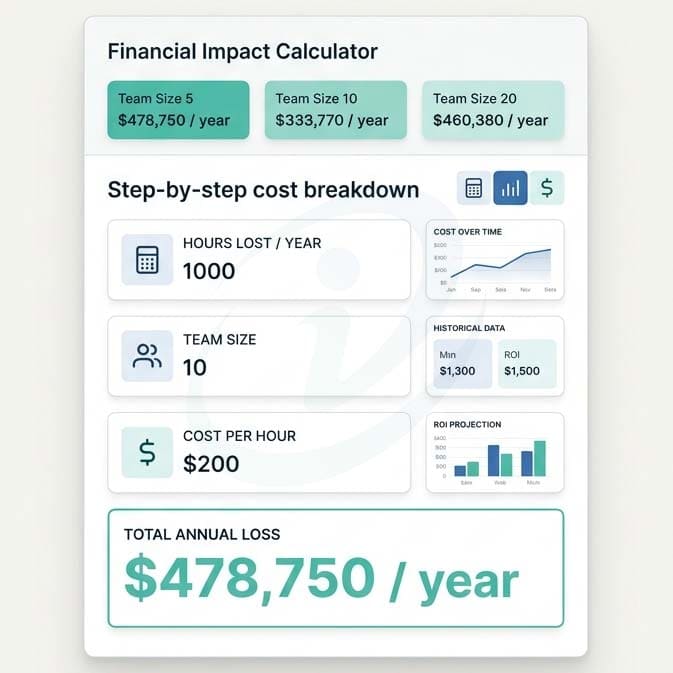
You’re spending $7,200 to recover $478,750.
The ROI isn’t debatable. It’s absurd.
Your Current Stack vs. FlowSync
| Reality | Frankenstein Stack | FlowSync |
|---|---|---|
| Context switching per task | 3–5 tool toggles | 0–1 toggles |
| Visibility into progress | Requires status meetings | Real-time dashboard |
| Ownership clarity | “Who’s handling this?” confusion | Every task shows assignee |
| Time to onboard new hires | 2 weeks learning 5+ tools | 2 days learning 1 system |
| Weekly status meeting length | 3–6 hours across team | 0 hours (data already visible) |
This isn’t about adding another tool. It’s about eliminating five.
Start Your 14-Day Efficiency Audit
No credit card. No commitment. Just your team working the way remote work was supposed to feel.
What you’ll see in 14 days:
- Fewer “Where is that file?” questions
- Status meetings that become optional because the dashboard already answers them
- New hires productive in days, not weeks
- Time saved that you can actually measure
Setup takes 10 minutes:
- Invite your team
- Import current tasks (or start fresh)
- Watch the Toggle Tax disappear
If it doesn’t work? Walk away. No questions asked.
If it does? You just bought back 200+ hours per month. For your entire team.
[Start Your Free 14-Day Trial →]
No credit card required • Cancel anytime • Import your existing work in minutes
- Built for teams of 5–50 who are tired of tool sprawl.
- Trusted by remote teams at [Company logos or “50+ remote teams”]
- Questions? [Live chat available] or [Schedule a 15-minute demo]
Why This Works: The Conversion Mechanics Behind the Page
Bold Insight: A SaaS landing page that quantifies the cost of inaction converts faster than one that describes the value of action — because the buyer is already paying.
Psychological Triggers Applied
| Trigger | How It’s Used |
|---|---|
| Loss Aversion | “You’re already paying this cost” reframes inaction as ongoing expenditure, not missed opportunity. Loss triggers a stronger response than equivalent gain — the $478,750 is framed as money currently leaving, not money potentially saved |
| Blame Redirection | “You’re not disorganized. You’re over-equipped” removes the self-blame that makes buyers defensive. A visitor who feels understood rather than criticised is far more likely to keep reading |
| Financial Specificity | The step-by-step Toggle Tax calculation is shown in full — not summarised. Visible arithmetic is trusted more than assertions. Conversion-focused product pages consistently show that showing the work builds more credibility than stating the conclusion |
| Mirror Moments | Four emotional payoffs — Friday 5 PM, Sunday night, new hire in 10 seconds, relaxed board meeting — give the exhausted buyer something to feel, not just something to calculate |
| “Efficiency Audit” CTA Reframing | Positioning the trial as a diagnostic rather than a commitment reduces psychological friction for risk-averse buyers. “Audit” implies assessment, not purchase — which is precisely what a hesitant buyer needs to hear |
Conversion Architecture: Section by Section
| Section | Job | Buyer State It Addresses |
|---|---|---|
| Hero — Toggle Tax | Names and quantifies the hidden cost | “Something is wrong but I can’t articulate it” |
| Frankenstein Stack | Validates the chaos without judgment | “Maybe I made the wrong choices” (shame) |
| One System / Mirror Moments | Shows the felt experience of the solution | “Is this actually different from what I have?” |
| ROI Math | Provides budget justification | “I can’t get approval without a number” |
| Comparison Table | Compresses the argument for scanners | “Just show me the difference quickly” |
| CTA Section | Removes risk and quantifies upside | “What if it doesn’t work for us?” |
Why the ROI Math Section Is the Page’s Highest-Leverage Element
Most SaaS landing pages hide their ROI claim in a testimonial or a vague “teams save X hours per week.” This page shows the full calculation — inputs, arithmetic, and multiple team-size outputs — in a dedicated section framed as “the math leadership is ignoring.”
This does three things simultaneously:
- Provides budget ammunition. The buyer can screenshot this and present it to their CFO without additional research.
- Signals brand confidence. A company that shows its full cost calculation rather than glossing over it trusts its product to survive scrutiny.
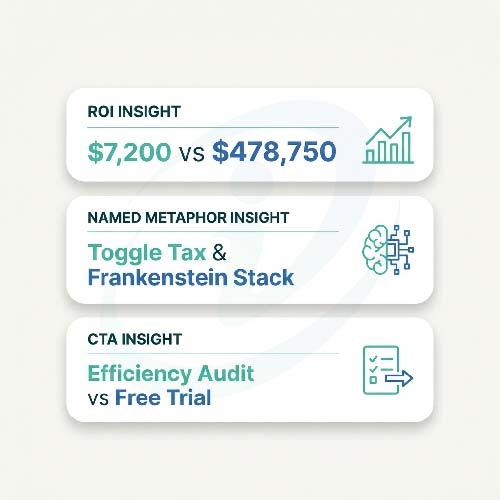
- Converts the decision frame. “$7,200 to recover $478,750” makes the cost of the tool feel negligible beside the cost of inaction.
Content that builds trust and authority in B2B categories does this through transparency and specificity — not enthusiasm. The Toggle Tax calculation is the most quotable, shareable, and trust-generating element on the page for exactly this reason.
Key Takeaways
- Quantify the cost of inaction, not just the value of action. “You’re already paying $478,750” converts faster than “save $478,750” because loss aversion is a stronger decision trigger than equivalent gain. An SEO-driven content strategy requires every key claim to be specific, verifiable, and independently useful — the Toggle Tax calculation meets all three.
- Named metaphors give buyers language to justify the decision internally. “Toggle Tax” and “Frankenstein Stack” aren’t brand-building flourishes — they’re cognitive tools that help buyers articulate the problem to their teams, their CFOs, and themselves.
- Blame redirection is a prerequisite for conversion in the SaaS category. A visitor who feels their current setup was a mistake they made is defensive. A visitor who understands their current setup was a predictable industry design problem is receptive.
- The ROI math section is the page’s real CTA. It provides budget ammunition, signals brand confidence through transparency, and converts the decision frame from preference to arithmetic. Most SaaS pages bury this — showing it is the differentiator.
- Mirror moments bridge the rational and emotional buyer simultaneously. Every B2B buyer is also a person who dreads Sunday nights and wants to close their laptop at 5 PM. The Mirror Moments acknowledge this without sacrificing the ROI argument.
- CTA framing determines perceived commitment level. “Efficiency Audit” implies assessment with no obligation. “Free Trial” implies you’re testing whether to buy. For a buyer with tool fatigue, the difference is meaningful.
FAQ
Why does the page lead with a cost calculation rather than a feature overview?
Because the visitor’s primary objection isn’t “I don’t understand what this does” — it’s “I’m not sure we need another tool.” A feature overview confirms their fear. A quantified cost of inaction reframes the conversation entirely: the question shifts from “do we need FlowSync?” to “can we afford to keep paying the Toggle Tax?”
How does the “Frankenstein Stack” section work as a conversion mechanism?
It removes the buyer’s shame about their current setup — which is the psychological barrier that makes them defensive about changing anything. A visitor who understands their mess was an industry design problem (not a leadership failure) is ready to evaluate a solution. One who feels judged for their current choices is not.
Why is the ROI calculation shown in full rather than summarised?
Visible arithmetic is trusted more than stated conclusions. A claim like “teams recover $478,750 in annual productivity” sounds like marketing. The step-by-step calculation — inputs, arithmetic, team-size outputs, and a comparison to platform cost — looks like a business case. The buyer can bring it to their CFO exactly as it appears on the page.
What makes the “Efficiency Audit” CTA framing more effective than “Start Free Trial”?
“Free Trial” implies the buyer is testing whether to purchase. For a visitor with tool fatigue, that’s a commitment they’re not ready to make. “Efficiency Audit” implies a diagnostic — an assessment of whether FlowSync addresses their specific situation. The framing reduces perceived commitment without reducing conversion intent.
Can this landing page strategy apply to other B2B SaaS categories beyond project management?
Yes — the four-pillar structure transfers to any B2B SaaS product where: (a) the buyer has a measurable operational inefficiency they haven’t quantified, (b) the competitor set includes a “Frankenstein Stack” of point solutions, and (c) the hesitation is “we already have too many tools” rather than “we don’t have this problem.” CRM, HR tech, finance tools, and workflow automation all present the same conditions.
Writing SaaS Landing Pages Where Trial Hesitation Kills Conversions?
This case study is for B2B SaaS brands and product-led growth teams where the product genuinely solves a measurable problem — but the landing page is leading with features instead of the financial cost of not acting.
If your conversion page fails to give the buyer a number to bring to their CFO, a name for the problem they’re experiencing, and a low-commitment entry point that feels like a diagnostic rather than a purchase — this is the strategic copywriting framework that changes that.
Get in touch to discuss your landing page strategy.
Get Conversion-Focused SaaS Landing Page Strategy That Turns ROI into Signups
For B2B SaaS brands where buyers need financial justification—not feature lists—to take action.