SaaS and Technology Email Campaign Case Study
How Conversion-Focused Email Strategy Turned Trial Users into Paying Customers
Scope:
Trial-to-Paid Email Conversion Strategy for SaaS Product
Industry:
B2B SaaS / Productivity Tools / Project Management
What Was Delivered:
3-Email Conversion Sequence (Trial Days 1–13)
Strategic Overview
A 3-email trial conversion sequence for FlowSync that moves trial users from “evaluating software” to “I can’t go back” — by naming the invisible mental labor they’re doing for free, quantifying the financial waste their current stack produces, and locking in a new operational identity before the trial expires.
Understanding how content influences buying decisions for B2B SaaS trial users reveals the core problem: most trial sequences send feature reminders. This sequence sends a diagnosis.
The Problem: Why Most SaaS Trial Email Sequences Fail to Convert
Trial users who don’t convert within 14 days rarely leave because the product didn’t work. They leave because they never shifted from evaluating a tool to depending on a system.
The failure modes are consistent:
- Feature-reminder sequences — “Don’t forget to try our Gantt chart view” — reinforce the framing that FlowSync is another tool to manage. This is the opposite of the perception shift needed for conversion.
- No blame redistribution — Trial users who still feel their tool chaos is a discipline failure don’t commit to a new system. They assume they’ll fail with this one too.
- No financial anchor — Without a concrete dollar figure tied to their team’s actual setup, the monthly fee feels like a cost. With one, it feels like cost recovery.
- Migration anxiety left unaddressed — “Switching is a lot of work” is the silent objection that kills conversions on Day 13. Most sequences never acknowledge it, let alone remove it.
The strategic insight this sequence is built on: the decision to pay isn’t made by feature discovery — it’s made when the user can no longer imagine returning to what they had before.
The Strategy
Four Pillars Behind the Sequence
Trial-to-paid conversion is an identity shift, not a feature evaluation. The email sequence that wins is the one that makes the old stack feel intolerable — not the one that makes the new tool feel impressive.
Diagnosis Before Solution
Instead of pushing features, the first email names the user’s hidden problem — cognitive overload from fragmented tools. This removes self-blame and creates immediate relevance.
ROI as Authority
The sequence quantifies context-switching into real financial loss, turning abstract frustration into a measurable business problem tied to revenue.
The product shifts from expense to cost recovery.
Identity Lock-In
The campaign reframes adoption as an identity shift — from managing chaos to operating with clarity — making the old workflow feel unacceptable.
Churning feels like regression, not cancellation.
Habit Formation Loop
Each email reinforces a simple daily workflow inside the product, helping users experience consistent operational clarity during the trial.
Usage becomes routine — and routine drives conversion.
The Execution: Full Email Sequence
Email 1: The Emotional Anchor — Days 1–3
Subject A: You’re not overwhelmed. Your system is.
Subject B: The mental labor you’re doing for free
Preview: (This isn’t about discipline. It’s about design.)
Strategic Intent: Diagnose cognitive load as unpaid mental labor. Externalise blame to fragmented tools. Tease the Toggle Tax calculation for Email 2.
Hi [First Name],
Day 3 of your FlowSync trial.
Quick question: At the end of yesterday, could you name what actually moved forward?
Not what felt busy. What shipped.
If the answer took more than 5 seconds — or if you had to check three tools to reconstruct it — you’re experiencing something I need to name.
You’re doing unpaid mental labour.
Your brain is spending energy on work your tools should handle:
- Remembering where information lives
- Translating context between systems
- Rebuilding task state after every tool switch
- Playing human API between Slack and project boards
This creates constant low-grade mental fatigue. Not burnout. Just end-of-day exhaustion without progress.
The phrase you keep using? “I worked all day… but I can’t point to what moved.”
That’s not poor time management. That’s fragmentation tax.
Here’s What’s Really Happening
Your current stack forces your brain to do three jobs simultaneously:
- The actual work — strategy, decisions, execution
- System translation — moving context between tools
- Truth reconstruction — figuring out what’s real vs. outdated
Jobs 2 and 3? Those shouldn’t exist.
When decisions live in Slack, commitments live in tasks, files live elsewhere, and accountability lives nowhere — you become the connective tissue.
Your role becomes: Human API.
And APIs don’t get paid for cognitive overhead.
Why You Inherited This
You didn’t design a bad system. The industry gave you fragments and called it “best-in-class modularity.”
Each tool is locally optimised. Your workflow suffers globally.
What vendors sold as flexibility became cognitive drag. What they called integration became permanent context loss.
You’re not failing to adapt. You’re successfully managing an unmanageable system.
That ends now.
Tomorrow, I’m going to show you the exact cost of this chaos — and why FlowSync users get back 5–10 hours per week per person by Day 7.
It involves 23 minutes. And it’s been hiding in plain sight.
— [Name]
FlowSync
P.S. Noticed something yet? You haven’t checked Slack first thing this morning. You opened FlowSync. That shift — where you look for truth first — is already happening.
Strategic Logic — Email 1
- Opening diagnostic question: “Could you name what actually moved forward?” forces immediate self-audit. Users who check three tools to reconstruct their day have already confirmed the problem before the email names it.
- “Unpaid mental labour” frame: Positions cognitive load as stolen wage rather than personal inefficiency. This removes self-blame — the key barrier to trial commitment.
- “Human API” metaphor: Creates vivid, shareable language for a previously unnamed frustration. Users who have a name for their pain are far more likely to present the solution to their stakeholders.
- Behaviour recognition in P.S.: “You haven’t checked Slack first thing this morning” reinforces desired habit through observation, not instruction — a significantly more durable behaviour-change mechanism.
Email 2: Authority & Education — Days 4–8
Subject A: The 23-minute problem nobody’s tracking
Subject B: What your tool stack is really costing you
Preview: (This is where the maths gets uncomfortable.)
Strategic Intent: Deliver on the Email 1 open loop. Quantify abstract productivity loss into recoverable dollars. Position FlowSync as financial recovery, not software expense.
[First Name],
Let’s talk about the number I promised you.
23 minutes.
That’s how long the brain needs to fully refocus after a context switch. Not the interruption itself — the recovery afterward.
Every time you toggle from Slack to your project board to Drive to email, you’re paying a 23-minute refocus tax.
And nobody’s tracking it.
[IMAGE: Visual representation of Toggle Tax — time bleeding away with each app switch]
Here’s the Maths Leadership Is Ignoring
Let’s be conservative. Your team switches tools 5 times per day.
That’s 115 minutes lost per person daily just recovering focus.
Scale it:
For a 10-person team:
- 115 minutes × 10 people = 1,150 minutes per day
- 1,150 minutes = 19+ hours daily
- 19 hours × 5 work days = 95 hours per week
- 95 hours × 50 weeks = 4,750 hours annually
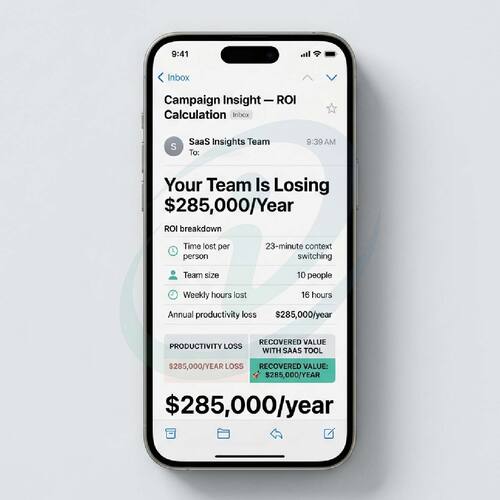
4,750 hours × $60 = $285,000 per year
You’re burning a mid-level engineer’s salary on context switching alone.
For a 20-person team: ~$570,000/year
For a 5-person team: ~$142,500/year
This isn’t hypothetical. This is your P&L bleeding productivity.
Convert to dollars at $60/hour (conservative for knowledge workers):
What Changed for Teams Using FlowSync
Day 7 average: 5–7 hours reclaimed per person per week.
That’s 50–70 hours monthly for a 10-person team. Hours previously spent:
- Hunting files across three tools
- Repeating context in status meetings
- Manually coordinating handoffs
- Checking “Is this the latest version?”
Where those hours went:
✓ Sarah (product lead) stopped doing Friday status syncs. Dashboard shows everything.
✓ Marcus (engineering manager) cut stand-ups from 30 minutes to 10. Blockers visible in real time.
✓ Team onboarding dropped from 2 weeks to 3 days. One system to learn instead of five.
These aren’t cherry-picked wins. This is what happens when you stop paying the Toggle Tax.
The Frankenstein Stack Reality
Your current setup isn’t bad management. It’s the natural result of industry design:
What vendors sold you:
- Best-in-class modularity
- Flexibility to choose your stack
- Seamless integrations
What you actually got:
- Cognitive drag translating between systems
- Decision latency waiting for context
- Permanent information fragmentation
Each tool optimised locally. Your workflow suffers globally.
FlowSync doesn’t add to this chaos. It collapses it.
One system. One timeline. One source of operational truth.
Tomorrow, I’ll show you what happens when teams hit the point of no return — the moment they realise they can’t go back to tool chaos once they’ve seen clarity.
— [Name]
FlowSync
P.S. Curious where your specific team’s Toggle Tax is hiding? [LINK: Run Your Team’s 2-Minute ROI Calculation]. No email required. Just your team size and average hourly rate.
Strategic Logic — Email 2
- Open loop delivery: Opening with “the number I promised you” rewards the reader for opening. Follow-through builds trust more effectively than any feature claim.
- Conservative framing: “Let’s be conservative. 5 times per day” prevents defensive rejection (“That’s not us”). Users who switch more often self-correct upward — the real number feels even more damning.
- Multiple team-size cohorts: Showing $285k (10 people) / $570k (20 people) / $142k (5 people) lets readers self-identify their exact financial exposure without a form fill.
- Named user outcomes: Sarah and Marcus deliver specific, believable time savings — not abstract percentage improvements. Specific claims are trusted; vague ones are ignored.
Email 3: Conversion & Logic — Days 9–13
Subject A: You can’t go back once you see clearly
Subject B: What happens after the trial ends
Preview: (This is the point of no return.)
Strategic Intent: Lock in the identity shift from chaos-manager to clarity-operator. Remove migration friction through Migration Concierge offer. Convert trial belief into behavioural commitment before the 14-day expiry.
[First Name],
Day 11 of your trial.
You’ve seen something now that you can’t unsee.
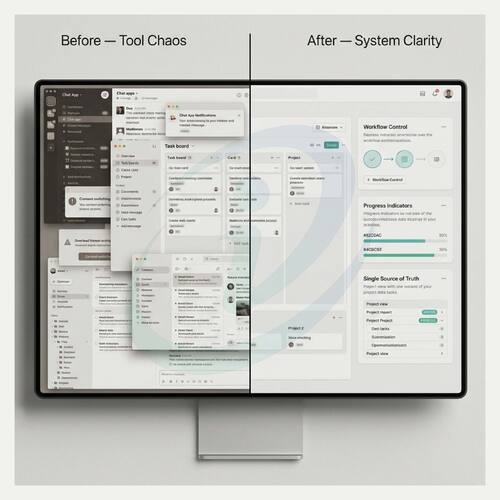
The 10-minute morning ritual that replaced an hour of tool-checking. The dashboard that shows what’s blocked without asking. The clarity that exists when truth lives in one place instead of five.
You can’t go back to tool chaos once you’ve worked with visibility.
The Hot Take Nobody Wants to Say
Slack isn’t a collaboration tool.
It’s a productivity leak disguised as responsiveness.
Every “quick question” is an interruption. Every thread is context that disappears into scroll. Every notification is a toggle away from focused work.
And you already know this. You’ve felt it.
The difference now? You have an alternative.
FlowSync doesn’t replace Slack. It reduces it. Messages become signals, not noise, because context lives where work happens — not where conversations scroll away.
Status meetings don’t exist because teams lack discipline. They exist because systems failed.
When work is visible in real time, the meeting becomes optional. You already know what moved. What’s blocked. What needs a decision.
That shift — from asking to knowing — is what you’re feeling right now.
What Happens Next
Your trial ends in 3 days.
Here’s what teams tell us about the moment they decide:
“I tried going back to the old stack for one day. I couldn’t do it. Too much friction.” — Sarah, product lead
“I realised I was spending 20% of my week just figuring out what was happening. That’s gone now.” — Marcus, engineering manager
“Onboarding our new hire took 3 days instead of 2 weeks. She was productive immediately because everything was in one place.” — Jamie, ops director
This isn’t about features. It’s about not going backward.
You’ve built a habit. You open FlowSync first. You see what needs your attention. You intervene without meetings. You close the tab and get back to real work.
That habit is worth protecting.
Your Migration Is Already Done
Here’s what most teams worry about: “The work of switching.”
You’ve already switched. You’ve been using FlowSync for 11 days.
Your current tasks are here. Your team knows where to look. The muscle memory is forming.
The hard part is over. The only question is whether you keep going.
If you’re still hesitant about technical migration — importing existing workflows, integrating with current tools, training your team — we handle it.
Migration Concierge: Our team books 2 hours with you to import, integrate, and train. You sit back. We migrate. Free for all new annual plans.
The Decision
Option 1: Go back to the Frankenstein Stack.
Multiple tools. Multiple truths. Toggle Tax restored. Mental labour returns.
Option 2: Keep the clarity you’ve built.
One system. One timeline. One source of truth. Time stays recovered.
Your trial ends in 3 days. If FlowSync hasn’t given you back 5+ hours per person per week, don’t pay.
But if it has — and you know it has — lock it in.
[Upgrade to Annual Plan →]
Migration Concierge included • 20% savings vs. monthly • Cancel anytime first 30 days
You’ve seen what clarity feels like. Don’t give it back.
— [Name]
FlowSync
P.S. Still comparing options? [LINK: Book a 15-minute strategy call]. We’ll audit your current stack, calculate your exact Toggle Tax, and show you what full migration looks like. No pitch. Just analysis.
Strategic Logic — Email 3
- “Can’t unsee” frame: Positions clarity as a cognitive threshold — once crossed, the old stack feels intolerable rather than familiar. This makes churning feel like regression, not cancellation.
- Slack hot take: “It’s a productivity leak disguised as responsiveness” gives users permission to reject tool dependency. Tribal identity — “I’m someone who sees this truth” — is stronger than product loyalty.
- Migration already complete: “You’ve already switched. You’ve been using FlowSync for 11 days” reframes the decision from “should we migrate?” to “should we keep what we’ve already built?” This removes activation energy from the conversion decision.
- Binary choice framing: Option 1 uses regression language (“Go back to chaos”); Option 2 uses progress language (“Keep the clarity”). The framing does conversion work before the CTA is read.
- Migration Concierge: Removing the “work of switching” objection directly — “You sit back. We migrate” — converts the largest remaining friction point into a service advantage.
Why This Works: The Conversion Mechanics Across All Three Emails
The sequence wins by making the old stack feel financially irrational in Email 2 and emotionally intolerable in Email 3 — so that the upgrade decision feels less like a purchase and more like protecting something already owned.
Psychological Triggers Applied
| Trigger | How It’s Used |
|---|---|
| Blame Externalisation | Email 1 names the industry as the designer of fragmented stacks. A trial user who stops blaming their own processes for chaos is ready to commit to a replacement |
| Named Concepts | “Human API,” “Toggle Tax,” “Frankenstein Stack” give users shareable language for internal problems. Named problems get budget approvals. Unnamed frustrations get tolerated |
| Loss Aversion (Financial) | Email 2 quantifies current waste — $285,000/year for a 10-person team — rather than projecting future savings. Framing existing losses as recoverable is a stronger motivator than equivalent projected gains |
| Identity Lock-In | Email 3 positions FlowSync use as a new operational identity — “someone who works with clarity” — making cancellation feel like a personal regression, not just a product decision |
| Migration Already Complete | Reframing 11 days of trial use as completed migration removes the primary friction point for hesitant converters. The work isn’t ahead of them — they’ve already done it |
| Binary Choice Architecture | Option 1 (regression) vs. Option 2 (progress) forces active decision rather than passive trial expiration. The framing language does conversion work before the CTA appears |
Conversion Architecture: Email by Email
| Timing | Core Job | Psychological Move | CTA | |
|---|---|---|---|---|
| Email 1 | Days 1–3 | Diagnose unpaid mental labour | Externalise blame → create psychological safety | None — safety first |
| Email 2 | Days 4–8 | Quantify the financial waste | Loss aversion → make status quo feel irrational | ROI calculator (soft) |
| Email 3 | Days 9–13 | Lock in identity, remove migration friction | Identity shift → make churning feel like regression | Annual plan upgrade |
Why the Migration Concierge Offer Is the Sequence’s Highest-Leverage Conversion Element
Most trial sequences address product value. This one addresses the primary reason people don’t convert after positive trials — the perceived work of full migration.
“You’ve already switched. You’ve been using FlowSync for 11 days” first reframes 11 days of trial use as completed migration. Then the Migration Concierge removes whatever technical anxiety remains.
Conversion-focused product pages show the same principle: removing friction at the final conversion step produces higher returns than adding incentives. The Concierge does both simultaneously — it removes friction and reframes the upgrade as a supported transition rather than a solo project.
Open Loop Strategy Across the Sequence
| Cliffhanger | Open Loop It Creates | |
|---|---|---|
| Email 1 | “23 minutes. It’s been hiding in plain sight.” | Reader needs the calculation resolved |
| Email 2 | “The point of no return” teaser | Reader wants to understand what that identity shift feels like |
| Email 3 | Binary choice frame | Forces active decision before trial expires |
Each open loop is resolved in the next email — rewarding opens with follow-through, not more selling.
Content that builds trust and authority in B2B categories operates on exactly this principle: delivering on promises creates more trust than making new ones.
Key Takeaways
- Trial-to-paid conversion is an identity shift, not a feature discovery. The email sequence that wins is the one that makes the old stack feel intolerable — not the one that makes the new tool feel impressive. An SEO-driven content strategy principle applies here too: every email must be independently useful and specific enough to earn the next open.
- Named concepts give trial users the language to justify the decision internally. “Human API,” “Toggle Tax,” “Frankenstein Stack” aren’t brand-building flourishes — they’re cognitive tools that help users explain the problem to their teams and CFOs. Problems with names get approved. Unnamed frustrations get tolerated.
- Quantify current losses rather than projecting future gains. “You’re burning $285,000 in context-switching waste” converts faster than “save $285,000 with FlowSync” — because loss aversion is a stronger motivator than equivalent gain at the exact decision point.
- Removing migration friction at Day 11 is more valuable than adding conversion incentives. The Migration Concierge doesn’t offer a discount — it removes the primary reason positive trial users don’t convert. Friction removal at the final step produces higher returns than incentive stacking.
- The “migration already complete” reframe changes the decision entirely. Moving from “should we migrate?” to “should we keep what we’ve already built?” removes activation energy from the conversion. The user stops evaluating and starts protecting.
- Open loops that are actually resolved build trust faster than features. Delivering “the 23 minutes” in Email 2 as promised in Email 1 is a trust signal. It demonstrates that the brand follows through — which is exactly what a hesitant B2B buyer needs to see before committing.
FAQ
Why doesn’t Email 1 include a CTA or a conversion prompt?
Because the user is on Day 3. A conversion prompt on Day 3 signals the brand cares more about the subscription than the user’s outcome — which is the exact impression that kills trial engagement. Email 1’s only job is to make the user feel diagnosed, understood, and curious about what comes next. Trust built in Email 1 is what makes Emails 2 and 3 possible.
How does the “migration already complete” reframe work as a conversion mechanism?
The primary objection for hesitant Day 11 trial users isn’t “I don’t like the product” — it’s “switching fully sounds like a lot of work.” By pointing out that they’ve been using FlowSync for 11 days, the copy reframes the decision from “should we start a migration?” to “should we keep going with what we’ve already started?” This removes activation energy from the conversion — the perceived work is already behind them.
What makes the Toggle Tax calculation more persuasive in an email than in a blog post?
In an email at Day 5 of a live trial, the calculation is personal — the user is actively experiencing context-switching right now. The same maths in a blog post is hypothetical. In a trial email, it’s a description of the user’s current week, which makes the financial waste feel immediate and recoverable rather than theoretical.
Can this three-stage conversion architecture apply to other SaaS trial categories?
Yes — Cognitive Relief → Operational Proof → Identity Lock-In transfers to any SaaS product where: (a) the buyer’s current workflow is a recognisable mess they haven’t named, (b) there’s a quantifiable operational cost to the status quo, and (c) the product creates a felt experience shift (not just a feature improvement). CRM onboarding, finance automation trials, and DevOps tools all present the same conditions.
Why is the binary choice in Email 3 (Option 1 / Option 2) more effective than a standard upgrade CTA?
A standard “Upgrade Now” CTA allows passive expiration — the user doesn’t decide, they just don’t act. The binary choice forces active deliberation: the user must consciously choose Option 1 (regression language) or Option 2 (progress language). Framing Option 1 as going back ensures that almost no user who has experienced clarity will actively choose it. The CTA converts what would be passive churn into active commitment.
Writing SaaS Trial Email Sequences Where Conversion Drops After Sign-Up?
This case study is for B2B SaaS brands and growth teams where trial users sign up with genuine interest—but fail to convert into paying customers.
If your trial sequence sends feature reminders instead of diagnosing the operational problem the product solves — or if it leads with upgrade prompts before the user has experienced a cognitive shift — this is the strategic email architecture that closes that gap.
Get in touch to discuss your email campaign strategy.
If Your Trial Emails Aren’t Converting,
It’s a Perception Problem—Not a Product Problem
If your trial sequence pushes features instead of diagnosing the operational problem—or asks for upgrades before a cognitive shift happens—this is the strategy that closes that gap.
Izwiq Digital works with SaaS and technology brands on email campaigns that turn trial usage into paid commitment.