
SaaS and Technology Blog Content Case Study
How ROI-Focused Blog Content Turned SaaS Traffic into Trial-Ready Buyers
Scope:
SEO Blog Content Strategy & Long-Form Pillar Content
for B2B SaaS Lead Generation
Industry:
B2B SaaS / Productivity Tools / Remote Work / Project Management
What Was Delivered:
Long-Form SEO Blog Post (~1,500+ words)
Conversion-Focused Content Strategy (1 Pillar Asset)
Strategic Overview
A long-form pillar post written for FlowSync that moves remote team leads from “our scattered workflows are frustrating” to “we’re losing six figures annually and here’s the calculation” — turning abstract productivity frustration into a business case that earns trial signups.
Understanding how content influences buying decisions for software-fatigued B2B buyers means starting with the cost they’re already paying — before introducing any solution. This post quantifies the problem before it names the product.
The Problem: Why B2B SaaS Blog Content Fails to Convert Hesitant Buyers
Remote team leads in the 5–50 person range are the hardest B2B SaaS audience to convert through content. They bring three entrenched objections:
- “We already have too many tools.” Generic benefit-led content confirms this fear — it reads like another platform asking for a slot in an already-overcrowded stack.
- “We just need better processes.” The reader attributes their team’s friction to discipline failures, not systemic tool design. Until that misattribution is corrected, no feature comparison will land.
- “I can’t get budget approval.” Without a concrete, step-by-step ROI calculation tied to their team size, the decision stays theoretical — and the trial never starts.
The content gap: most SaaS blog posts describe the solution. Almost none quantify the cost of the status quo in a way the reader can bring directly to their leadership.
This post was built to close that gap — by providing the calculation, not just the conclusion.
The Strategy
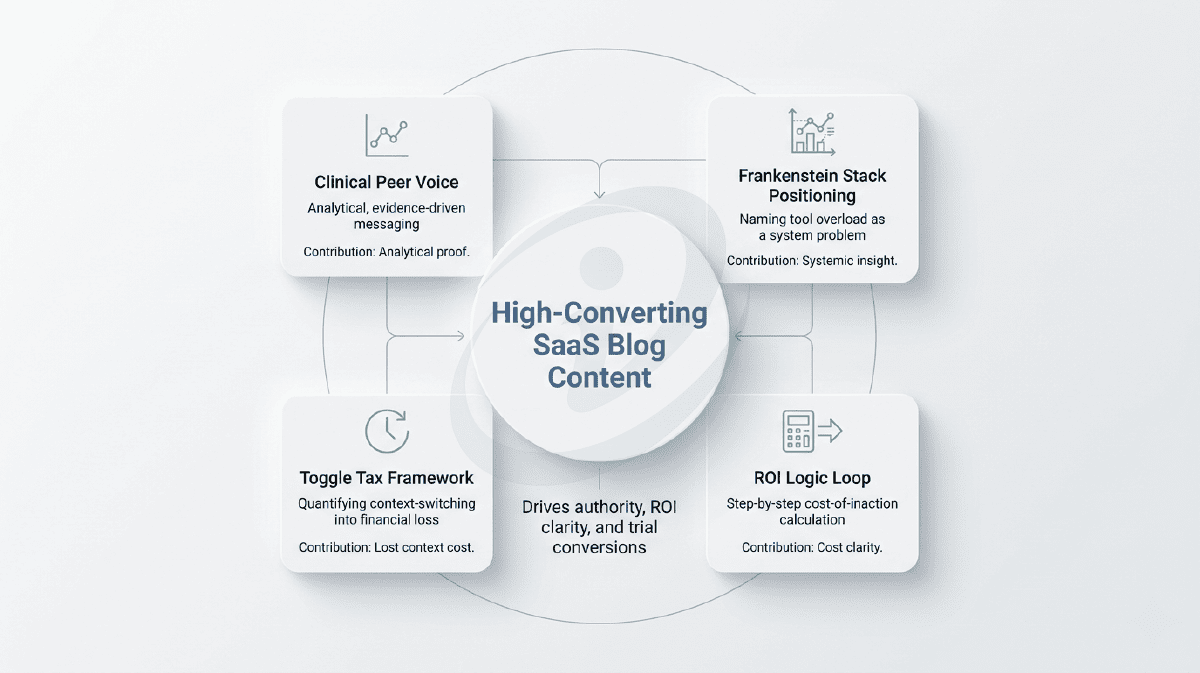
Four Pillars Behind the Post
The most effective B2B SaaS content doesn’t position the product as a solution — it positions the reader’s current setup as a measurable financial leak.
The Toggle Tax Framework
The content reframes context-switching as a measurable financial loss, not a productivity inconvenience. By anchoring it in cognitive recovery time and translating that into annual salary waste, it turns invisible inefficiency into a concrete business problem.
What felt like “minor friction” becomes a six-figure cost worth fixing.
Frankenstein Stack Positioning
Instead of blaming teams for inefficiency, the content positions tool overload as a systemic design flaw. Naming it the “Frankenstein Stack” gives buyers a clear way to describe their chaos internally.
The problem becomes explainable — and explainable problems get budget approval.
The ROI Logic Loop
Rather than claiming ROI, the content walks readers through calculating it themselves using a simple, repeatable framework. This shifts the argument from persuasion to self-discovery.
Readers leave with a CFO-ready business case — removing the approval barrier.
Clinical Peer Voice
The tone avoids typical SaaS marketing language and instead adopts a direct, analytical voice that mirrors how buyers think. It prioritizes clarity, numbers, and evidence over hype.
The content reads like a consultant’s assessment — not a sales pitch.
The Execution: Full Blog Post
Project Management for Remote Teams: The $100k Productivity Leak No One Is Tracking
Primary Keyword: “project management for remote teams” — 8 natural occurrences
Target Audience: Remote team leads and founders managing teams of 5–50 struggling with “work about work”
Conversion Goal: 14-day free trial signup; pre-built ROI case for leadership conversations
Four tabs open. Three Slack notifications pinging. Two different versions of the “Final_v2” spreadsheet. One missed deadline.
Welcome to the Toggle Tax.
The average knowledge worker spends 58% of their day on “work about work” — meetings to discuss meetings, hunting for files in three different drives, chasing updates that should’ve been automated. That’s not a productivity problem. That’s a friction problem.
Your team isn’t lazy. Your tools are just making them work twice as hard.
Remote teams face a specific version of this chaos: the Frankenstein tech stack. Email for clients. Slack for quick questions. Google Drive for files. Trello for tasks. Zoom for meetings. Asana for the other tasks because someone on the team preferred it.
Each tool solves one problem. Together, they create a bigger one.
The hidden cost? Context switching.
Every time someone toggles between apps, their brain needs 23 minutes to refocus. Do that five times a day, and you’ve lost two hours. Do it across a five-person team, and you’ve burned 50 hours a week on digital whiplash.
This is what project management for remote teams actually solves. Not “organisation.” Friction.
The Real Cost of Remote Chaos — Why “It Feels Fine” Is Dangerous
What a “Frankenstein Stack” Looks Like in 5–50 Person Teams
Let’s talk about what’s really happening when your team uses seven different tools.
The File Scavenger Hunt.
Someone asks for the Q3 budget. Is it in Drive? Dropbox? That Slack thread from two weeks ago? The version someone emailed as an attachment? You spend 12 minutes searching. Find three versions. None match. Now you need a meeting to figure out which one is real.
The “Quick Question” Culture.
Slack becomes a chaos feed. Every question interrupts four people’s focus. Half the team mutes notifications to get work done — which means they miss actual urgent updates. The other half drowns in noise. Either way, communication breaks.
Shadow IT Creep.
Marketing uses Notion. Sales uses Monday. Dev uses Jira. Leadership uses Excel because “it’s what they know.” Now you’re paying for four subscriptions and none of them talk to each other. Data lives in silos. Progress is invisible.
Status Update Theatre.
No one knows what anyone else is doing, so you schedule meetings to find out. Thirty minutes every Monday. Another hour mid-week. Friday wrap-ups. Six hours a month spent asking “What’s the status?” when the work tracker should already show it.
The budget line says “software costs.” The real cost is your team’s mental bandwidth.
Why Software Fatigue Is a Finance Problem, Not a Productivity One
“We just need better processes.”
No. You need fewer tools.
Every additional platform is another login, another notification system, another place where critical information can hide. Your team isn’t failing to adapt. They’re drowning in cognitive overhead.
Software fatigue is decision fatigue in disguise. Where did I save that file? Which tool am I supposed to update? Who has the latest version?
These aren’t productivity questions. They’re friction points that compound into hours of lost work.
The Illusion of Busyness vs. Actual Output
Slack activity looks like work. Responding to 47 messages feels productive. But if half those messages are “Where’s the file?” or “Can you update the board?” — you’re not producing. You’re managing chaos.
Activity ≠ output.
Your team can be busy all day and ship nothing because they’re spending their time searching, repeating, and coordinating work that should be automated.
The Toggle Tax Explained — Where the Money Actually Leaks
What Context Switching Really Costs Per Employee Per Day
Here’s the maths nobody wants you to do.
Every time your brain switches contexts — Slack to email to project board to spreadsheet — you lose focus. Research shows it takes an average of 23 minutes to regain full concentration after an interruption.
How many times does your team switch tools in a day?
Let’s be conservative: 5 times.
That’s 115 minutes lost per person per day. Nearly two hours spent re-orienting instead of executing.
From Minutes Lost → Hours Lost → Annual Salary Waste
Let’s scale that up.
Per person:
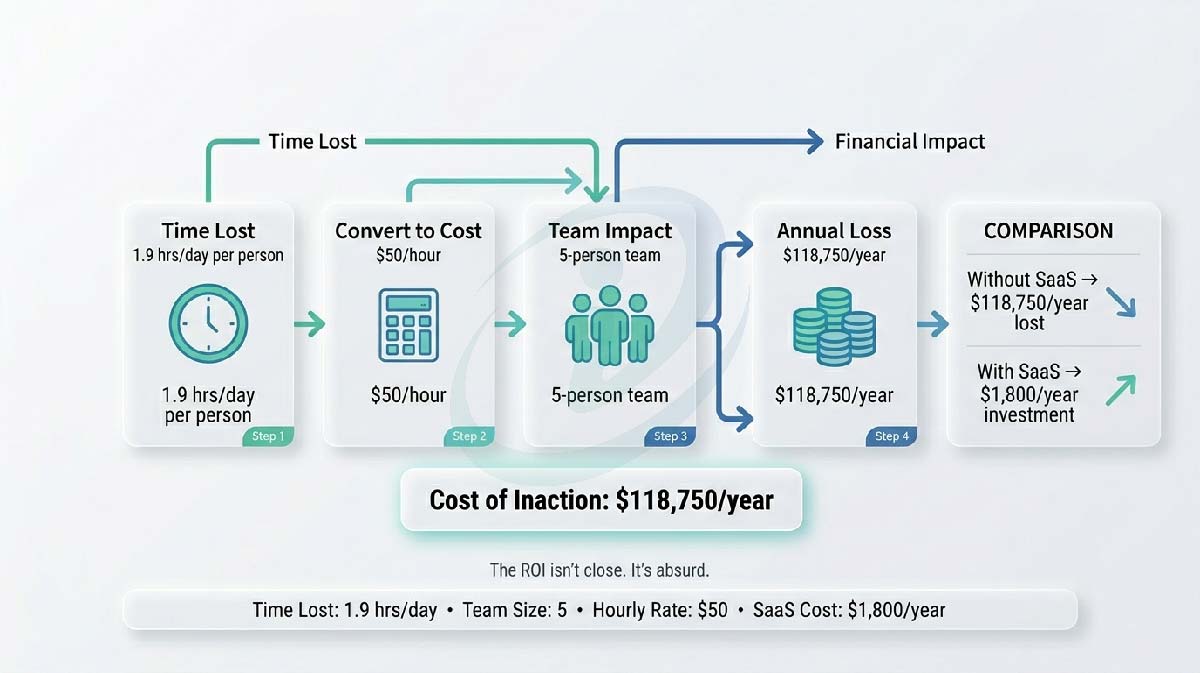
- 115 minutes lost daily = 1.9 hours
- 1.9 hours × 5 work days = 9.5 hours per week
- 9.5 hours × 50 weeks = 475 hours per year
Per 5-person team:
- 475 hours × 5 people = 2,375 hours annually
- At an average rate of $50/hour = $118,750 in lost productivity
You’re burning six figures on context switching alone.
Why Remote Teams Are Hit Harder Than In-Office Teams
In-office teams can shout across desks. Remote teams send a Slack message. Then wait. Then check email. Then check the project board. Then send a follow-up.
Asynchronous communication is powerful — when it’s centralised. When it’s scattered across five platforms, it’s chaos with latency.
Remote work didn’t create the Toggle Tax. It just made it impossible to ignore.
The ROI Logic Loop — Turning Time Loss into Dollar Loss
Step 1 — Identify Repetitive Daily Toggles
Audit your team’s typical day. How many times do they:
- Switch from Slack to check a task status?
- Leave a project board to find a file in Drive?
- Jump to email to locate a client request?
- Open a separate tool to log time or update progress?
Count the toggles. Be honest. It’s probably 8–12 per day, not 5.
Step 2 — Convert Time into Payroll Cost
Time isn’t abstract. It’s salary.
If your team members earn $100k annually, their hourly rate is roughly $50. Every hour lost to context switching is $50 you’re paying for friction, not output.
Step 3 — Multiply Across Headcount and Annualise the Loss
| Team Size | Hours Lost Per Week | Annual Hours Lost | Annual Cost (at $50/hr) |
|---|---|---|---|
| 5 people | 47.5 hours | 2,375 hours | $118,750 |
| 10 people | 95 hours | 4,750 hours | $237,500 |
| 25 people | 237.5 hours | 11,875 hours | $593,750 |
This isn’t hypothetical. This is your P&L bleeding productivity.
Step 4 — Compare Against the Cost of Centralised Project Management
Most project management platforms cost $10–30 per user per month. For a 5-person team at the high end:
$30 × 5 = $150/month = $1,800/year
You’re spending $1,800 to recover $118,750.
The ROI isn’t close. It’s absurd.
Why Project Management for Remote Teams Must Be Centralised
One Source of Truth vs. Five Partial Versions
When tasks live in Trello, files live in Drive, conversations live in Slack, and client requests live in email — nobody has the full picture.
Centralised project management creates one source of truth. Task status, files, comments, deadlines, decisions — all in one place. No hunting. No version confusion. No “I didn’t know we needed that by Friday.”
Fewer Tools ≠ Less Power — It Means Better Leverage
Consolidation isn’t about limitation. It’s about amplification.
When your tools integrate, you stop manually bridging gaps. A client email automatically creates a task. A completed task triggers a Slack notification. File updates show up in context.
You’re not doing less. You’re automating the busy work.
Decision Velocity as a Competitive Advantage
The team that ships faster wins. The team that spends two hours in status meetings every week ships slower.
Centralised visibility means decisions happen in real time. You see the blocker. You reassign the task. You unblock the workflow. No meeting required.
Speed compounds.
The Integration Force Multiplier — Slack & Gmail as Signal, Not Noise
Turning Slack from a Distraction into an Action Layer
Slack isn’t the problem. Using Slack as a filing system is.
When Slack integrates with your project management platform, it becomes an interface, not a database. Task updates notify you in Slack. You respond. The platform updates. Slack doesn’t store the information — it surfaces it.
Communication without documentation chaos.
Email as Input, Not a Parallel Workflow
Client sends an email request. Normally: someone reads it, copies it to Slack, tags the assignee, manually creates a task, sets a reminder.
With integration: The email automatically creates a task. Tags the assignee. Sets the deadline. Notifies in Slack. Updates the dashboard. Done in 3 seconds.
This is the force multiplier. Not replacing tools — making them work together.
How Centralised Systems Reduce Meetings, Not Add Process
Meetings exist to answer questions that dashboards should answer automatically:
- What’s the status?
- Who’s working on what?
- Are we on track?
- What’s blocked?
When the answer is visible in real time, the meeting becomes optional.
Your team gets back 3+ hours per week. That’s 150+ hours per year. Per person.
What Changes After Centralisation — The Before / After Reality
Frankenstein Stack vs. Centralised Flow
| Reality | Frankenstein Stack | Centralised Flow |
|---|---|---|
| Task Tracking | Scattered across Trello, Asana, Notion | Single source of truth |
| Status Updates | 6 hours/month in meetings | Real-time visibility, zero meetings |
| File Management | Hunts through Drive, Dropbox, email | Attached to tasks, searchable instantly |
| Context Switching | 8–12 daily toggles | 2–3 daily toggles |
| Onboarding Time | 2 weeks learning 5+ tools | 2 days learning 1 system |
| Annual Productivity Loss | $118,750 (5-person team) | Recovered |
Fewer Status Meetings, More Execution Time
Before: “Let’s sync on where everything stands.”
After: Everyone already knows. They saw it on the dashboard.
Time saved: 3 hours per week per team.
Clear Ownership Without Micromanagement
Before: “Who’s handling this?”
After: Every task shows assigned owner, due date, current status. Accountability is built-in.
Transparency without surveillance.
Predictable Delivery Instead of Firefighting
Before: Deadlines sneak up. Bottlenecks hide until they explode.
After: Dashboard shows what’s at risk. You intervene early. Deadlines stay intact.
Proactive management, not reactive chaos.
The Hidden ROI Most Founders Miss
Reduced Burnout and Tool Fatigue
Cognitive load isn’t just inefficiency. It’s exhaustion.
When your team stops juggling seven tools, they stop burning mental energy on “Where did I put that?” and “Which app am I supposed to use?”
Lower turnover. Higher retention. Better morale.
Faster Onboarding for New Hires
Training someone on five tools takes two weeks. Training them on one integrated system takes two days.
Your new hire is productive faster. Your existing team spends less time training. Onboarding costs drop.
Better Forecasting and Resource Planning
When you can see what everyone’s working on in real time, resource planning stops being guesswork.
You know who’s overloaded. Who’s available. What’s behind schedule. You adjust before problems compound.
Strategic visibility, not reactive scrambling.
The Real ROI: Your Team’s Sanity
Let’s do the maths one more time.
If your five-person remote team each saves 10 hours a week, that’s 50 hours back. At an average hourly rate of $50, that’s $2,500 per week in reclaimed productivity.
$10,000 per month.
$120,000 per year.
And that’s just the time. It doesn’t count:
- The project that didn’t fail because someone saw the blocker before the deadline
- The client relationship that didn’t sour because communication stayed clear
- The team member who didn’t burn out because “work about work” stopped eating their evenings
Most project management platforms cost $10–30 per user per month. Even at the high end, you’re paying $1,800 per year for a five-person team.
The ROI isn’t close. It’s absurd.
Try FlowSync Free for 14 Days
No credit card. No commitment. Just your team, working the way remote work was supposed to feel.
Set up takes 10 minutes. Invite your team. Import your current tasks — or start fresh. See if the Toggle Tax disappears.
If it doesn’t work? Walk away. No hard feelings.
If it does? You just bought back 10 hours a week. Per person.
[Start Your Free Trial →]
Why This Works: The Conversion Mechanics Behind the Post
B2B SaaS content that hands the reader a pre-built business case converts faster than content that makes them build it themselves — because the approval hurdle is the real conversion barrier, not product understanding.
Psychological Triggers Applied
| Trigger | How It’s Used |
|---|---|
| Loss Framing | “You’re burning six figures on context switching alone” frames inaction as ongoing expenditure. Loss triggers a stronger response than equivalent gain — $118,750 leaving is more motivating than $118,750 potentially saved |
| Named Metaphors | “Toggle Tax” and “Frankenstein Stack” give readers language to articulate the problem to their teams and CFOs. Problems with names get budgets. Unnamed frustrations get deferred |
| Blame Redirection | “Your team isn’t lazy. Your tools are making them work twice as hard” removes self-blame that makes buyers defensive. A reader who feels understood rather than criticised stays open to the argument |
| Activity ≠ Output | Exposing that Slack activity feels productive but doesn’t equal shipping challenges a cultural assumption that protects the status quo. Named assumptions, once challenged, create urgency |
| Pre-Built Business Case | The four-step ROI Logic Loop isn’t just persuasion — it’s infrastructure. The reader finishes the section holding a CFO-ready calculation they didn’t have to build |
Conversion Architecture: Section by Section
| Section | Job | Buyer State It Addresses |
|---|---|---|
| Fragment hook + Toggle Tax intro | Creates immediate recognition and names the problem | “Something is wrong but I can’t articulate it” |
| Frankenstein Stack scenarios | Validates chaos as industry-caused, not self-caused | “Maybe we just need better discipline” (shame) |
| Toggle Tax calculation | Converts time loss into salary waste | “Productivity loss is hard to quantify” |
| ROI Logic Loop (4 steps) | Provides leadership-ready financial justification | “I can’t get approval without a number” |
| Centralisation argument | Reframes “fewer tools” as amplification | “Won’t this just be another tool to manage?” |
| Before/After table | Compresses the transformation for scanners | “Just show me the difference quickly” |
| Hidden ROI section | Surfaces non-financial benefits: burnout, retention, morale | “The numbers don’t capture everything we’re losing” |
| CTA | Removes risk and names the upside | “What if it doesn’t work for us?” |
Why the ROI Logic Loop Is the Post’s Highest-Leverage Section
Most SaaS blog posts either assert ROI (“save up to X hours per week”) or bury it in a case study. This post teaches readers to calculate it themselves — in four explicit, copyable steps.
Conversion-focused product pages show the same principle for e-commerce: buyers who see the work shown trust the outcome more than buyers who receive a summarised conclusion. The same is true for B2B content.
The four-step format does three things simultaneously:
- Provides budget ammunition. The reader can present the calculation to their CFO as their own analysis — not as a vendor’s marketing claim.
- Signals brand confidence. A brand that publishes a full cost calculation trusts its product to survive scrutiny.
- Converts the decision frame. “$1,800 to recover $118,750” makes the cost of inaction — not the cost of the tool — the financial conversation.
Content that builds trust and authority in B2B categories does this through specificity and transparency, not enthusiasm. The Toggle Tax calculation and the ROI table are the most shareable, quotable, and trust-generating elements in the post for exactly this reason.
Key Takeaways
- Quantify the problem before naming the solution. $118,750 in annual productivity waste is a more powerful opener than any feature comparison — because the reader recognises the cost as something they’re already paying, not something they might save. An SEO-driven content strategy requires that every key claim is specific, verifiable, and independently useful to the reader — the Toggle Tax calculation meets all three.
- Named metaphors give buyers language to justify the decision internally. “Toggle Tax” and “Frankenstein Stack” aren’t brand-building flourishes — they’re cognitive tools that help readers articulate the problem to their teams, their CFOs, and themselves. Problems with names get budgets.
- The ROI Logic Loop removes the approval hurdle — which is the real conversion barrier, not product understanding. A B2B buyer who can present a four-step calculation to their CFO doesn’t need to convince anyone. They need to present findings they already have.
- Blame redirection is a prerequisite for conversion in the software fatigue category. A reader who feels their current setup was a mistake they made is defensive. A reader who understands it was a predictable industry design problem is ready to evaluate alternatives.
- “Activity ≠ output” challenges the cultural assumption that protects the status quo. Readers who believe their team is productive — just busy — don’t have a purchasing motive. Naming the distinction creates one.
- The before/after comparison table serves a different reader than the prose does. Time-poor decision-makers scan tables, not paragraphs. Both are needed — in sequence — to serve the full buyer spectrum.
FAQ
Why does the post spend the first half on the problem before mentioning the solution?
Because B2B buyers with software fatigue reject solution-first content as “another vendor trying to sell me a platform.” A post that spends 60% of its length quantifying the cost of the status quo earns the reader’s receptivity before any product is introduced. By the time FlowSync appears, the reader isn’t evaluating whether they need it — they’re evaluating whether it delivers the ROI the post described.
How does the ROI Logic Loop function differently from a standard benefits section?
A benefits section tells the buyer what they’ll gain. The ROI Logic Loop teaches the buyer to calculate what they’re currently losing — in four steps they can reproduce themselves. The difference is ownership: a calculation the reader builds feels like their own finding. A number stated by a vendor feels like a marketing claim.
Why are “Toggle Tax” and “Frankenstein Stack” strategically valuable beyond being memorable names?
Named concepts give readers language to bring into internal conversations — team meetings, budget discussions, CFO presentations. A reader who says “we’re experiencing Toggle Tax” in a leadership meeting is no longer describing a vague productivity concern. They’re describing a quantified, nameable problem — which is the exact framing that unlocks budget approval.
Can this content architecture apply to other B2B SaaS categories beyond project management?
Yes. The framework transfers to any SaaS product where: (a) the buyer has a measurable operational inefficiency they haven’t quantified, (b) the competitive landscape includes a “Frankenstein Stack” of point solutions, and (c) the primary hesitation is “we already have too many tools.” CRM, HR tech, finance automation, DevOps tooling, and data infrastructure all present the same conditions.
What makes the clinical peer voice more effective than standard SaaS marketing tone?
Remote team leads are sophisticated buyers who have been exposed to years of SaaS marketing hype. They filter “streamline your workflow” immediately. A blunt, consultant-grade voice that says “The ROI isn’t close. It’s absurd” reads as a peer’s honest assessment — which this audience trusts far more than polished brand messaging.
Writing B2B SaaS Blog Content That Gives Buyers a Business Case, Not Just a Benefit List?
This case study is for SaaS brands and content teams where the product solves a measurable operational problem — but the blog content is still relying on features instead of quantified cost-of-inaction.
If your content ranks but fails to move buyers past the “we already have too many tools” objection — the issue isn’t visibility. It’s the lack of a financial case.
Get in touch to discuss your content strategy needs.
Turn Your Blog Into a Conversion Asset — Not Just Traffic
Get a content strategy built to quantify ROI, remove approval friction, and move readers to trial.