

Hire a Designer: Build Brand Trust and Save Time with Smart Design Choices
Making the decision to hire a designer can feel overwhelming for small business owners juggling marketing, client work, and daily operations. With tools like Canva offering quick templates and affordable solutions, many solopreneurs wonder if professional design is truly necessary. The truth? There’s a smart middle ground – and knowing when to invest in professional design versus DIY can save you hours of frustration while building genuine trust with your audience.
This guide will help you understand exactly when hiring a designer makes strategic sense for your business growth, how to maximize your design budget, and how to combine DIY tools with professional expertise for maximum impact.
Why Design Still Matters for Small Business Growth
First Impressions Build (or Break) Trust
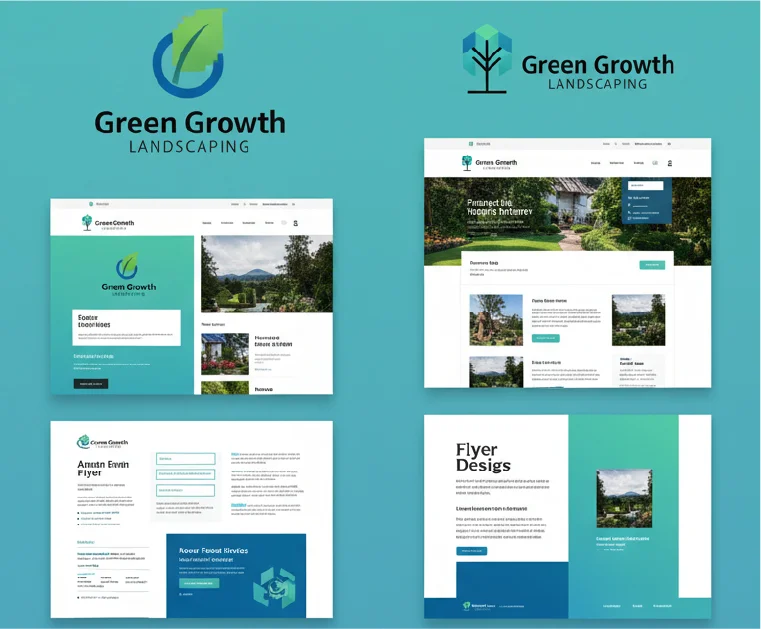
Your visual identity is often the first conversation you have with potential clients – before they read a word or hear your pitch. Research shows that consistent brand presentation across platforms increases revenue by up to 23%, and consumers form opinions about brands within just 50 milliseconds of viewing their visual materials.
When your logo, website, and marketing materials feel cohesive and polished, they signal professionalism and reliability. Conversely, inconsistent or amateur-looking designs can trigger doubt, making potential clients question whether you can deliver quality results. For small businesses competing in crowded markets, this visual credibility isn’t optional – it’s essential for marketing support for small business success.
How Good Design Converts Attention into Action
Great design doesn’t just look pretty – it guides your audience toward action. Strategic visual hierarchy, intentional color choices, and clear typography work together to make your message instantly understandable. When someone can quickly grasp what you offer and why it matters, they’re far more likely to engage, inquire, and ultimately buy.
Consistent branding also makes your business memorable. When clients see your distinctive visual style across social media, email, and your website, recognition builds naturally. This familiarity breeds trust, leading to referrals and repeat business – the foundation of sustainable growth for solopreneurs and small teams.
Canva for Entrepreneurs – When DIY Design Works
Everyday Design Made Simple
Canva revolutionized design accessibility for small business owners, and for good reason. The platform offers:
- Affordable monthly pricing that fits tight budgets
- Thousands of templates optimized for social media, presentations, and marketing materials
- Drag-and-drop simplicity that requires zero technical skills
- Quick turnaround for time-sensitive content like event announcements or weekly social posts
For everyday marketing needs – Instagram stories, Facebook graphics, simple flyers, or email headers – Canva delivers impressive results fast. It’s particularly valuable when you need to maintain a consistent posting schedule without hiring help for every single graphic.
The Hidden Costs of DIY
Despite its benefits, relying exclusively on Canva comes with real drawbacks that many entrepreneurs only discover after months of frustration:
Template fatigue sets in quickly.
When you’re using the same popular templates as thousands of other businesses, your brand starts blending into the background noise. Your audience might struggle to recognize your content in their crowded feeds.
Brand inconsistency creeps in gradually.
Without professional guidelines, it’s easy to experiment with different fonts, color palettes, and layouts across projects. What feels like creative flexibility actually creates a disjointed brand presence that confuses your
Time costs add up unexpectedly.
While Canva is technically easy to use, achieving professional-looking results requires learning design principles, experimenting with layouts, and tweaking details. Many business owners find themselves spending 2-3 hours on a “quick” project that should take 20 minutes.
If you’ve ever felt stuck in endless revision cycles or noticed your brand visuals feeling scattered, you’re experiencing the limits of pure DIY design. For more insights on essential design needs, explore graphic design essentials for small businesses.
When to Hire a Designer (and Why It’s Worth It)
Milestones That Signal It’s Time
Strategic moments in your business journey call for professional design investment. Consider whether to hire a designer when you’re facing:
- Website launches or redesigns where first impressions directly impact conversions
- Business rebrands that need to communicate evolution while maintaining recognition
- Product or service launches requiring cohesive visual campaigns across multiple channels
- Scaling phases when inconsistent DIY work starts limiting your professional image
- High-stakes presentations like investor pitches, speaking engagements, or major client proposals
These pivotal moments deserve design work that reflects your business’s true quality and potential.
The ROI of Professional Design
When you hire a designer, you’re investing in more than aesthetics – you’re purchasing strategic expertise that directly impacts your bottom line. Professional designers understand visual hierarchy, color psychology, typography, and user experience principles that transform generic templates into compelling brand experiences.
Consider this comparison: A DIY Canva logo might cost you 5 hours and $15, while a professional logo package costs $800-2000 but includes strategic brand development, multiple concepts, unlimited revisions, and file formats ready for any application. The professional option saves you dozens of future hours troubleshooting file issues and ensures your brand scales beautifully as you grow.
Studies on the impact of visual branding on consumer trust consistently show that professionally designed brands command higher prices and stronger customer loyalty – advantages that compound over time.
Canva vs Designer: The Smart Comparison
Decide Based on Purpose and Payoff
Before committing time or money to any design project, ask yourself three critical questions:
- What’s the primary purpose? Is this a throwaway social post or a foundational brand element you’ll use for years?
- How much time can I realistically invest? Be honest about your design skills and available hours.
- What’s at stake if it’s not quite right? Could poor design cost you clients, sales opportunities, or professional credibility?
Here’s a practical decision grid to guide your choice:
| Criteria | DIY with Canva | Hire a Designer |
|---|---|---|
| Cost | $0-15/month | $500-5000+ per project |
| Time Investment | 1-5 hours per project (learning curve) | 30 min briefing + reviews |
| Quality Level | Good for everyday content | Exceptional for brand foundation |
| Brand Impact | Maintains presence | Builds differentiation & trust |
Choose DIY when:
You need quick social content, event announcements, or internal documents where speed matters more than perfection.
Hire a designer when:
You’re launching something new, rebranding, creating customer-facing materials, or reaching a growth stage where your visual identity needs to match your expertise.
Finding Your Middle Ground
The smartest approach for most small businesses? A strategic hybrid model that maximizes both budget and impact:
Invest in designer-created brand templates that you can customize in Canva for daily use. A designer creates your core visual system – logos, color palettes, font pairings, and template layouts – then sets you up with branded Canva templates for ongoing needs. You get professional polish with DIY flexibility.
Establish clear brand guidelines that ensure consistency even when you’re working independently. A simple one-page document outlining your colors, fonts, and design dos and don’ts prevents the scattered look that undermines trust.
Outsource strategically by handling routine social graphics yourself while delegating major projects. This approach, combined with Virtual Business Support, lets you maintain momentum without constant creative decisions.
Design Support That Saves Time and Builds Trust
Combine Design Help with Virtual Business Support
Smart entrepreneurs recognize that design rarely exists in isolation – it’s part of a broader marketing and business system. When you hire a designer as part of integrated business support, you gain not just better visuals but also strategic thinking about how design fits into your growth plan.
Virtual support professionals can handle design coordination, brand asset organization, and template management, freeing you to focus on client delivery and business development. Check out specific tasks you can delegate to a virtual support professional to see how design fits into comprehensive business support.
This integrated approach means you’re not just getting isolated design files – you’re building a visual system that supports all your marketing efforts, from social media to client presentations to website updates.
Next Steps for Small Business Growth
Ready to make smarter design decisions? Follow this simple action plan:
- Conduct a design audit: Review your current brand materials objectively. Do they look cohesive? Professional? Do they reflect your business quality?
- Define your brand style: Even if you’re not ready to hire a designer yet, document your preferred colors, fonts, and visual direction. This prevents future inconsistency.
- Decide with purpose: Use the decision grid above to evaluate each upcoming project individually rather than committing to “always DIY” or “always hire.”
- Start small: If hiring feels overwhelming, begin with one strategic project – your logo or website – then expand as you see the impact.
Conclusion: Choose What Saves You Time and Grows Trust
The decision to hire a designer isn’t about choosing between affordable and expensive – it’s about aligning your design strategy with your business stage and goals. DIY tools like Canva serve genuine needs for everyday content, while professional designers provide the strategic foundation and high-impact visuals that build lasting credibility.
Most successful small businesses find their sweet spot in the middle: professional design for brand foundations and major launches, DIY execution for daily content using designer-created templates. This hybrid approach delivers both the consistency that builds trust and the flexibility that saves time.
Remember, you don’t have to figure out design alone. Whether you’re learning Canva basics or ready to invest in professional branding, small intentional steps toward visual consistency will strengthen your market presence and free you to focus on what you do best – serving your clients and growing your expertise.
Ready to build a brand that reflects your professional quality? Explore how strategic design support can reclaim your time while strengthening the trust that drives real business growth. Your clients are waiting to see the real you – let your visuals tell that story clearly.
Written by Muhammed
Muhammed is a graphic designer and virtual support professional with hands-on experience helping small businesses grow through smart marketing and design. He shares practical strategies that save time, build trust, and See how he helps entrepreneurs succeed without overwhelm.